Identity and family
DNI/NIE (Spanish ID) and passport, libro de familia, certificates, qualifications.
How it works
Easy to find, encrypted and to hand from day one. Then you decide who receives it, in what order and when. Here is every piece, calmly explained, so you know exactly what happens at each stage.
No card · Cancel anytime

The four steps
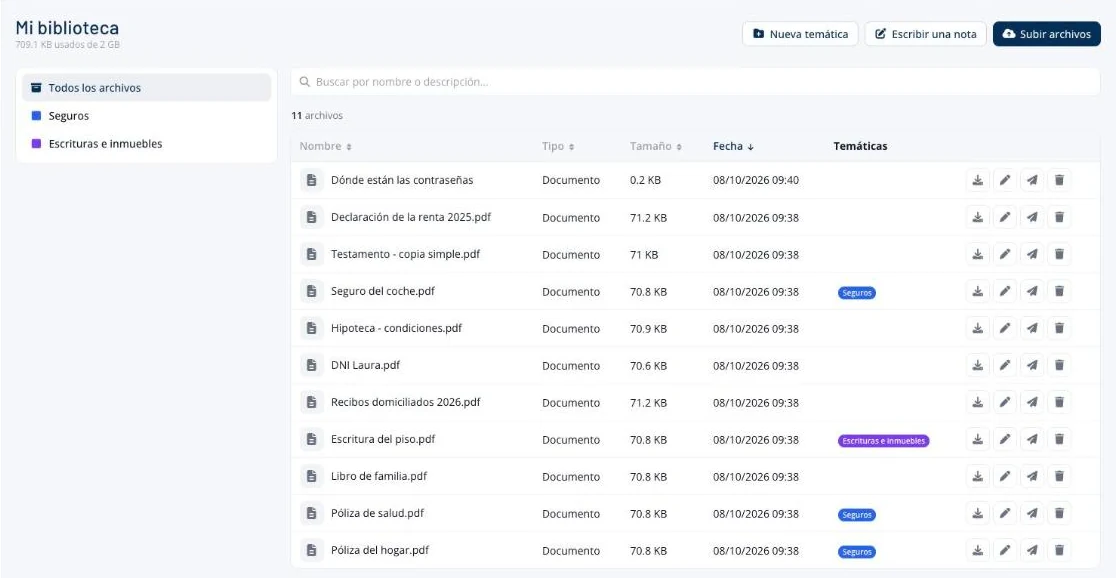
Deeds, insurance policies, contracts, your libro de familia (Spanish family book), your tax return. You upload them once and they’re easy to find from day one, on your phone or on any computer, with no more rummaging through drawers.
Things that aren’t files fit too. Where you keep your passwords, which bills need cancelling, what to do with the dog, who to call at work: you write it straight in as a secure note, encrypted just like a document. No creating a file, saving it to your desktop and remembering to delete it afterwards.
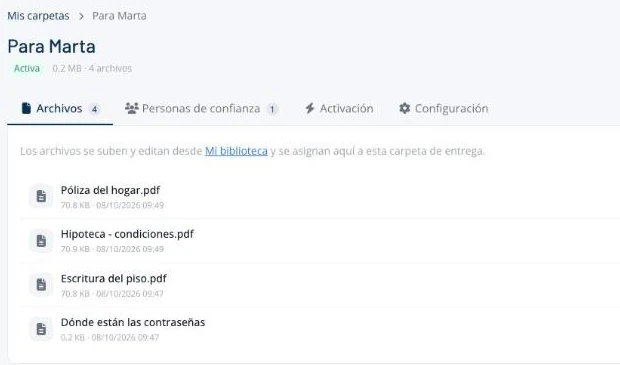
A delivery folder doesn’t store files: it picks which of yours each person receives. So the same document can go in your partner’s folder and in your gestoría’s (your accountant / tax adviser) without duplicating it – and if you update it, it’s updated everywhere.
Each folder has a description, so whoever receives it understands what they’re looking at without opening it: “The flat and the insurance”, “For the gestoría: clients and logins”.
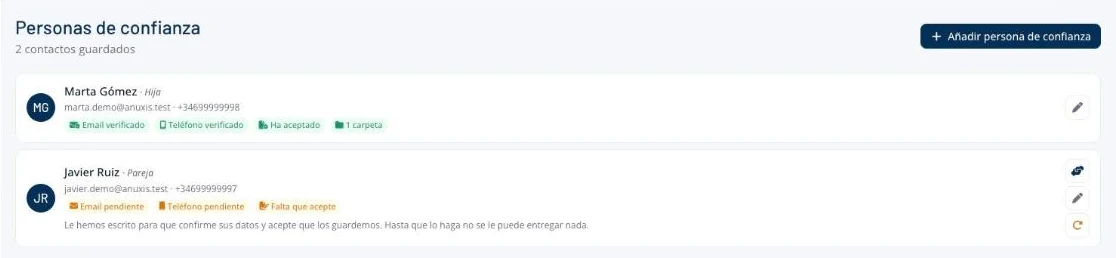
For each person you enter their name, email and mobile number. We let them know you’ve chosen them, explain what that means and what will happen when the time comes, and they confirm their email and phone number.
Until they confirm, they can’t receive anything – and it isn’t red tape: it’s what stops someone with a stolen email account from opening what you left ready. To download, they need both: the link in their email and the code on their phone.
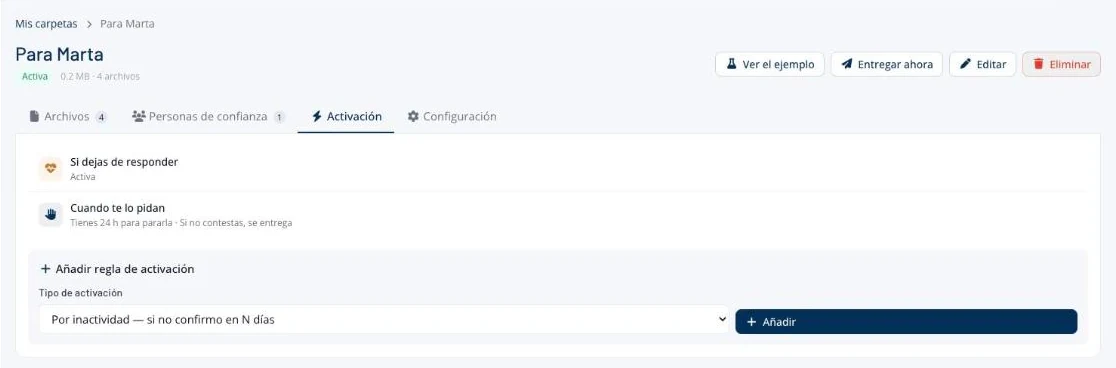
Each folder has its own delivery method, and you can combine several: when you say so, when they ask, on a set date or if one day you stop responding. We explain each one below.
What you can store
The same six categories as the printable template.
DNI/NIE (Spanish ID) and passport, libro de familia, certificates, qualifications.
The title deeds or the tenancy agreement, the mortgage, the utilities, the car’s paperwork.
Which banks you use and which bills come out of each account, your insurance policies with their numbers and the assistance helpline.
Your medication and doses, allergies, your doctor, your health insurance and what you’d want people to know about your care.
Who to tell, which clients need looking after, your gestoría or adviser.
Your phone’s passcode, how to get into your email, where your passwords are. And what only you know: what’s urgent and what can wait.
When it’s delivered
You press the folder’s button, confirm by typing their name, and it arrives there and then. For when you’re fine but someone needs something right now: your son is at the bank and is missing a document, your gestoría needs the contracts.
Your trusted contact requests access from the link they received when you chose them. We alert you straight away by email and SMS, and you have the waiting period you set to stop it. You choose what happens if you don’t reply: either it’s delivered, for when you can’t respond, or it isn’t, and they have to ask again.
For things that need to arrive on a specific day, whatever happens. Available on the Professional and Advanced plans.
The inactivity alert: every so often we ask whether you’re still there, and one click is enough. If one day you stop replying, delivery starts on its own, after alerting you. We explain it step by step further down.
When they ask
From the link you left them.
By email and SMS, with a button to stop it.
You choose it: a few hours, a day, three.
And you chose for it to be delivered, they receive it when the period ends, even if you weren’t able to reply.
They open the link in their email and enter the code sent to their phone.
Organised just as you prepared it. Hours – not the weeks it takes to gather a certificate or a power of attorney.
The inactivity alert
One click is enough. If you prefer, logging in to your account also counts as a reply. You choose how often: anywhere from 7 days to a year.
Seven days, or however many you choose.
By email and SMS, with the date the delivery would go out.
Your trusted contacts haven’t received a single email yet, and you can stop it with one click.
One click at any point resets everything. And if you’re going away, you confirm before you leave and the cycle starts again from scratch.
Why 21 days? So that delivery still goes out even if something happens to you just before your renewal and the payment fails: if payment can’t be taken, deliveries keep working for 30 days. Full details on the blog

No nasty surprises
Before anything goes out for inactivity, we email you and send you an SMS. Even if someone has access to your email, your phone is still yours.
If your email bounces and your mobile isn’t confirmed, we don’t treat your silence as an answer. We wait.
When delivery starts because you stopped responding, two days pass before a single link goes out.
From any folder, you can send yourself the exact email your trusted contact would receive: the same text, the same link, the same screen. Nothing is delivered and nobody else knows.
Someone who gets into your account with your password can delay the alert, but not indefinitely: after a while, a deliberate click is required. And every time someone signs in from a new browser, we let you know.
The day it’s needed
They don’t need an account, to install anything or to pay. And it doesn’t catch them by surprise: when you chose them, we told them so and explained what would happen when the time came.
With your name and the folder’s description. The link is valid for 72 hours; if it expires, they can request a new one from the same link: we alert you and, if you don’t stop it, we send it to them.
When they open the link, a code arrives by SMS. With only one of the two, nothing opens.
With the names and description you gave it. Only what’s theirs: nothing from the folders you didn’t assign to them.
Your trusted contacts
We tell them, and explain which folder it is and what will happen. They don’t find out on the day it’s needed.
If you choose several people, you decide whether they all receive it at the same time, or the closest first and, if they don’t respond, the next.
If they change their email or mobile, you update it and they confirm it again. If an email or SMS bounces, we let you know. And every now and then we ask you whether your contacts are still up to date.
From the notice they receive, with no explanation needed. We let you know so you can choose someone else.
Not the contents, not the file names, not when you log in.
When it helps
Your partner requests access and within hours has the policies, the bills and your doctor’s number.
You get it ready before you leave. If you don’t check in within the period you choose, it reaches whoever you’ve named.
A friend or relative in another city receives what’s needed if one day you don’t respond.
Your gestoría or a colleague receives the logins, so your clients aren’t left stranded.
What only you know – their medication, their doctors, their bills – reaches your brother if something happens to you.
What your family would otherwise spend months looking for – the accounts, the policies, where the will is, who to tell – reaches them organised and with your instructions.
Who it’s for
You sit down together one afternoon and set it all up, with the account in their name and you as their trusted contact. What today lives in a notebook or in their memory becomes safe and up to date.
Your partner and children find what they need without searching: where the papers are, which bills you pay, who to call.
Your family receives what’s theirs and your business what it needs, separately: the gestoría, the clients, the logins only you have.

On every plan
With documents and secure notes, to hand from anywhere.
Everything encrypted, and no one can ever open what’s meant for someone else.
For every trusted contact, before they can receive anything.
And your documents are still there.
Who accessed what, and when.
The two deliveries that don’t depend on you, always with an alert and time to stop them.
Delivery on a set date comes with the Professional plan, and the exportable activity log with Advanced. See the plans
The rest, whenever you like.
No card · Cancel anytime
Write to us and a person will reply, not a robot. You can also email info@anuxis.com.